Senin, 10 September 2012
Jumat, 03 Agustus 2012
Adrenaline™ Engine
░▒▄█▀▄░ █▀▄ █▀▀▄ █▀▀ █▄░█ ▄▀▄ █░░ ▀ █▄░█ █▀▀░░▒▐█▀▀ █▄░█ ▄▀▀░ ▀ █▄░█ █▀▀
▒▐█▄▄▐█ █░█ █▐█▀ █▀▀ █░▀█ █▀█ █░▄ █ █░▀█ █▀▀░░▒▐█▀▀ █░▀█ █░▀▌ █ █░▀█ █▀▀
▒▐█░▒▐█ ▀▀░ ▀░▀▀ ▀▀▀ ▀░░▀ ▀░▀ ▀▀▀ ▀ ▀░░▀ ▀▀▀░░▒▐█▄▄ ▀░░▀ ▀▀▀░ ▀ ▀░░▀ ▀▀▀

DISCLAIMER:
No one will be responsible for any problem Adrenaline™ Engine may cause to you. Proceed With Caution !
(By Installing Adrenaline™ Engine, You Have Agreed To This)
For those who want to include this into your ROM, please give proper credits and a link directs to this thread, thanks
Description
It's ThunderBolt by pikachu01. I repacked it with more features and optimized it !
Features
✔ Increase touchscreen sensitivity
✔ Less RAM usage through zipalign. | World first smart zipaligning
✔ Reduced /dbdata, /data, /sdcard usage of *.db files and faster database access. | World first smart sqlite optimizing
✔ Faster disk access through remount script (noatime, disabled barrier etc) | World first smart remounting
✔ Better network throughput from TCP tweaks and 3G tweaks
✔ Tons of prop tweaks
✔ Overall Better Performance and Battery Life
✔ Less lags through LMK Tweak and Various VM Tweaks
✔ Faster SDCARD Read/Write Speed
✔ Bypass website like thepiratebay.se | Thanks !
✔ CWM Flashable
✔ Transform your phone to Lamborghini. (joke , lol)
What You Need
◢ Android Gingerbread 2.3.x
◢ At least 2MB free on /system
◢ A Usable Brain
◢ A Pair of Sharp Eyes
◢ Clockworkmod (4/5 doesn't matter)
◢ Flashable zip Installing Experience
◢ Kernel that supports init.d
◢ Ext4 system format if you want to use the remount script
**Do a backup before your try anything as normal !!!
Installation
1.Delete all others script you have installed in "/system/etc/init.d"
2. Copy 'Adrenaline Engine.zip' to your phone SD card
*For those who are using Cyanogenmod, download CM version
3. Reboot your phone to recovery mode
4. Mount /system and /data
5. Flash Adrenaline Engine.zip
6. Reboot your phone when finished installation
7. Done
Note: Installing newer version of Adrenaline™ Engine will replace old version automatically
How to uninstall ?
Reboot cwm, mount /system and install Uninstaller from sdcard.
*For 3.5 and after, you need to download the new uninstaller to uninstall.
Download
▒▐█▄▄▐█ █░█ █▐█▀ █▀▀ █░▀█ █▀█ █░▄ █ █░▀█ █▀▀░░▒▐█▀▀ █░▀█ █░▀▌ █ █░▀█ █▀▀
▒▐█░▒▐█ ▀▀░ ▀░▀▀ ▀▀▀ ▀░░▀ ▀░▀ ▀▀▀ ▀ ▀░░▀ ▀▀▀░░▒▐█▄▄ ▀░░▀ ▀▀▀░ ▀ ▀░░▀ ▀▀▀
DISCLAIMER:
No one will be responsible for any problem Adrenaline™ Engine may cause to you. Proceed With Caution !
(By Installing Adrenaline™ Engine, You Have Agreed To This)
For those who want to include this into your ROM, please give proper credits and a link directs to this thread, thanks
Description
It's ThunderBolt by pikachu01. I repacked it with more features and optimized it !
Features
✔ Increase touchscreen sensitivity
✔ Less RAM usage through zipalign. | World first smart zipaligning
✔ Reduced /dbdata, /data, /sdcard usage of *.db files and faster database access. | World first smart sqlite optimizing
✔ Faster disk access through remount script (noatime, disabled barrier etc) | World first smart remounting
✔ Better network throughput from TCP tweaks and 3G tweaks
✔ Tons of prop tweaks
✔ Overall Better Performance and Battery Life
✔ Less lags through LMK Tweak and Various VM Tweaks
✔ Faster SDCARD Read/Write Speed
✔ Bypass website like thepiratebay.se | Thanks !
✔ CWM Flashable
✔ Transform your phone to Lamborghini. (joke , lol)
What You Need
◢ Android Gingerbread 2.3.x
◢ At least 2MB free on /system
◢ A Usable Brain
◢ A Pair of Sharp Eyes
◢ Clockworkmod (4/5 doesn't matter)
◢ Flashable zip Installing Experience
◢ Kernel that supports init.d
◢ Ext4 system format if you want to use the remount script
**Do a backup before your try anything as normal !!!
Installation
1.Delete all others script you have installed in "/system/etc/init.d"
2. Copy 'Adrenaline Engine.zip' to your phone SD card
*For those who are using Cyanogenmod, download CM version
3. Reboot your phone to recovery mode
4. Mount /system and /data
5. Flash Adrenaline Engine.zip
6. Reboot your phone when finished installation
7. Done
Note: Installing newer version of Adrenaline™ Engine will replace old version automatically
How to uninstall ?
Reboot cwm, mount /system and install Uninstaller from sdcard.
*For 3.5 and after, you need to download the new uninstaller to uninstall.
Download

Selasa, 31 Juli 2012
Free Hosting With PHP And MySQL
This time I will be posting articles on the list of free hosting, but hosting is equipped with a PHP / MySQL hosting means it is not much different from the paid hosting space with a capacity of 2GB, 100GB Bandwidth, PHP and MySQL, Site Builder, no ads or banners and there are many other advantages are free forever without any time limit, the second domain can be used as much as we want, but the subdomain provided by the hosting itself, and many other advantages compared to other free hosting.
Let us just start a list of free hosting with PHP and MySQL, the name of the websiteHostinger.com please click to register, first go to their website first and then click Order Now or Create an Account.

Further contents of Registration Form: Fill in your Name, Email, Password, Reset Password, then fill in the code capcha, and the last check “I agree to the Terms of Service” if you need to read first the rules and ordinances, then click “Create Account”

After clicking “Create Account” and then check your email account setup process is only half finished.

You will be sent 2 emails, first thank you for joining, and a second email containing the activation link that you must click to activate your account.

Once you click the activation link will take you to the page control panel there you have to fill in domain name hosting.

If your domain has not been able to select the option below that reads “I want to choose your subdomain (recommended)” which will address your url is: yourdomain.16mb.com, And if you have your own domain please select the option that reads “I want to use my own domain “, then fill in your domain name, Password, Retype Password, and finally the writing of characters from the image, and click” Create “, Oh yes I forgot if you want a free domain you can use a free domain name please go to www . co.cc to get a free domain name with the suffix. co.cc.

To go into your Cpanel please click the “Switch”
But first check your email again, email it is your cpanel login data.

Email this should not be lost because of the content data to enable, upload a file or content of the website later, the most important data of the contents of this email is the name or code name servers ns1 and ns2 to connect hosting and your domain when you use your own domain, and another what matters is the data address of the FTP hostname, use to upload your website files to the server hosting, data user name and password, after you click the “Switch” you will go into your cpanel page, where you can create a database, where none could be how to make database please click the article on How to create a database in Cpanel Hosting, cpanel on this page you can create a personal email, forward email and so forth.
It’s finished posting for free hosting with PHP and MySQL with this article may be useful for all my friends, especially for beginners who want to learn to make a website with your own domain and hosting.
Please read my other articles too: How To Upload Files Using FileZilla.
Modul Prestashop
Prestashop merupakan salah satu open source software yang digunakan untuk membuat toko online. Belum lama ini, pada Juli 2011 telah lebih dari 80ribu toko online yang menggunakan prestashop.
Salah satu kemudahan prestashop adalah banyaknya modul-modul untuk mendukung operasional toko online. Berikut adalah modul-modul yang bisa anda download GRATIS tis…tis….
- Modul Kurir JNE
- Modul Block User Online
- Modul JBX (membuat menu horizontal)
- Modul Google-Bing-Alexa Validation
- Modul Block Testimonial
- Modul Block Mail Editor
- Modul Facebook Fans Page
- Modul Bank Wire BCA
- Modul Bank Wire BNI
- Modul Tracking Resi/AWB
- Modul Wiznav 2.1.3 (membuat menu horizontal) NEW
- Modul Social Link Network (FB, twitter, tuenti, Hi5) NEW
- Modul Scroll to top page NEW
- Modul slideric (membuat animasi sliding di homepage seperti di www.clodaclodi.com)NEW
- Modul Google plus wan (Google+1) NEW
- Modul blockfooterdata NEW
atau bisa juga sohib akses dari halaman DOWNLOAD web ini.
Semoga bermanfaat.
Official ROM DXLA1
S5360DXLA1
Region: Asia -Indonesia - XSE
PDA: S5360DXLA1
PHONE: S5360DXLA1
CSC: S5360OLBLA1
Version: Android 2.3.6 Gingerbread
Date: January 2012
Stock ROM: GT-S5360_XSE_S5360_DXLA1_OLBLA1_DXLA1
Odin3 v.1.84 klo udah punya yg 1.85 pke itu juga bisa
Cara pakai lihat gambar :

Di Deteksi Kies FW asli

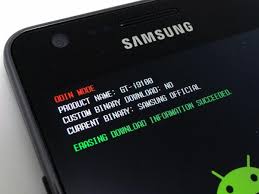
Jangan lupa
- install USB Driver dari cd Kies (install kiesnya aja skalian klo g mw repot)
- hpnya dijadiin download mode(Odin Mode)dengan cara
teken tombol down + home + power kemudian continue dengan tekan tombol up
- colokin kabel data ke PC
1. Buka odin v1.84.exe
2. pastikan yang tercentang cuma Auto reboot & F reset time
3. bagian PDA masukin file PDA_S5360_DXLA1.tar
4. bagian PHONE masukin file MODEM_S5360DXLA1.tar
5. bagian CSC masukin file CSC_S5360_OLBLA1.tar
6. klik start
7. semoga sukses1. Buka odin v1.84.exe
2. pastikan yang tercentang cuma Auto reboot & F reset time
3. bagian PDA masukin file PDA_S5360_DXLA1.tar
4. bagian PHONE masukin file MODEM_S5360DXLA1.tar
5. bagian CSC masukin file CSC_S5360_OLBLA1.tar
6. klik start
7. semoga sukses
Region: Asia -Indonesia - XSE
PDA: S5360DXLA1
PHONE: S5360DXLA1
CSC: S5360OLBLA1
Version: Android 2.3.6 Gingerbread
Date: January 2012
Stock ROM: GT-S5360_XSE_S5360_DXLA1_OLBLA1_DXLA1
Odin3 v.1.84 klo udah punya yg 1.85 pke itu juga bisa
Cara pakai lihat gambar :
Di Deteksi Kies FW asli
Jangan lupa
- install USB Driver dari cd Kies (install kiesnya aja skalian klo g mw repot)
- hpnya dijadiin download mode(Odin Mode)dengan cara
teken tombol down + home + power kemudian continue dengan tekan tombol up
- colokin kabel data ke PC
1. Buka odin v1.84.exe
2. pastikan yang tercentang cuma Auto reboot & F reset time
3. bagian PDA masukin file PDA_S5360_DXLA1.tar
4. bagian PHONE masukin file MODEM_S5360DXLA1.tar
5. bagian CSC masukin file CSC_S5360_OLBLA1.tar
6. klik start
7. semoga sukses1. Buka odin v1.84.exe
2. pastikan yang tercentang cuma Auto reboot & F reset time
3. bagian PDA masukin file PDA_S5360_DXLA1.tar
4. bagian PHONE masukin file MODEM_S5360DXLA1.tar
5. bagian CSC masukin file CSC_S5360_OLBLA1.tar
6. klik start
7. semoga sukses
Minggu, 29 Juli 2012
ICS Fusion Galaxy Y
ICS Fusion v2.0 is a custom ROM for Samsung Galaxy Y looks like Android 4.0 Icecream Sandwich.
U Can Also Try CREED'S ROM 3.5 FOR SAMSUNG GALAXY Y With NEW UPDATES CLICK HERE
What’s in it?
Based on SG5360DDLC3
Android version: 2.3.6
PDA : DDLC3
CSC : DDLC2
Features:
+ Stable, Fast, Rock Solid
+ ICS video player
+ Various Buid.prop Tweaks
+ ICS bootanimation enabled
+ CM9 bootanimation sound
+ Deodexed ROM
+ Zipalign
+ Rooted
+ BusyBox
+ Bash Shell Support
+ BusyBox run-parts support
+ Comes with Stock-like Kernel with init.d support
+ Full Support for Init.d scripts
+ Compatible with Merruk’s Kernels
+ Superuser Access
+ ICS keyboard
+ New galleryapp
+ New file browser
+ Asop lock screen ( default )
+ New camera app ( -installs LG camera (modded) recommended settings for LG camera:
640×480 , 1 mbits or 2 mbits , 30 or 25 FPS , video encoder and video file MP4 or 3GP , video stabilization : on )
+ ICS styled settings
+ ICS styled dialer
+ ICS styled caller background & image
+ ICS styled new file browser
+ ICS styled laucher
+Google Music
+ Bass/Treble Enhanced Sound
+ 14 Toggles by Lidroid ROM
+ Swipe to Remove Implementation
+ New Google Play Store; Google
Search Updates
+ Full Bravia Engine Port; Fix Xloud; Beats Integration
+ UI optimized; New Lockscreen by LockBot Pro
+ Addon Important Apps (see more inside!)
How to install?
1. Download all thezip files.
2. Copy all zip to SD Card (not in any folder)
3. When done, follow these steps:
4. Boot your phone in recovery mode by pressing vol up + vol down + home button.
5. Select apply update from sdcard.
6. Select Skin1980-GT-S5360 CWM.zip
Your phone will boot in ClockworkMod Recovery.
9. Select Wipe Data/reset
10. Select Yes-delete all users.
11. When data wipe complete, select Wipe cache partition.
12. Select Yes-delete all users.
13. Select Install zip from sdcard.
14. Select Choose zip from sdcard.
15. Select ICS Fusion Initial release.zip
16. Select Comfirm-Install ICS Fusion.
18. Flashing will start and may take 10 minutes.
19. When you get message Install from sdcard complete, select Reboot system now.
20. Your phone will restart and first boot may take 10 minutes.
21. Again boot into CWM recovery (step 1-6) .
21. Select Install zip from sdcard.
22. Select choose zip from sdcard.
23. Select ICS-Fusion 1.0 patch.zip
24. Flashing will start again and may last upto 10 minutes.
25. When you get the message Install from sdcard complete, select reboot system now.
Again boot in CWM andflash Superuser Fix.zip (do not wipe anything) and when flashing completed, reboot system.
27. Again boot in CWM recovery (steps 1-6).
28. Follow steps 9-20 but in step 15, flash ICS-Fusion v2.0 update version instead of that zip file.
Again boot into CWM and flash zBootAnim.zip ( do not wipe anything)
ICS Fusion v2 ROM flashed!
Screenshots:


Download Links:
U Can Also Try CREED'S ROM 3.5 FOR SAMSUNG GALAXY Y With NEW UPDATES CLICK HERE
What’s in it?
Based on SG5360DDLC3
Android version: 2.3.6
PDA : DDLC3
CSC : DDLC2
Features:
+ Stable, Fast, Rock Solid
+ ICS video player
+ Various Buid.prop Tweaks
+ ICS bootanimation enabled
+ CM9 bootanimation sound
+ Deodexed ROM
+ Zipalign
+ Rooted
+ BusyBox
+ Bash Shell Support
+ BusyBox run-parts support
+ Comes with Stock-like Kernel with init.d support
+ Full Support for Init.d scripts
+ Compatible with Merruk’s Kernels
+ Superuser Access
+ ICS keyboard
+ New gallery
+ New file browser
+ Asop lock screen ( default )
+ New camera app ( -installs LG camera (modded) recommended settings for LG camera:
640×480 , 1 mbits or 2 mbits , 30 or 25 FPS , video encoder and video file MP4 or 3GP , video stabilization : on )
+ ICS styled settings
+ ICS styled dialer
+ ICS styled caller background & image
+ ICS styled new file browser
+ ICS styled laucher
+
+ Bass/Treble Enhanced Sound
+ 14 Toggles by Lidroid ROM
+ Swipe to Remove Implementation
+ New Google Play Store; Google
Search Updates
+ Full Bravia Engine Port; Fix Xloud; Beats Integration
+ UI optimized; New Lockscreen by LockBot Pro
+ Addon Important Apps (see more inside!)
How to install?
1. Download all the
2. Copy all zip to SD Card (not in any folder)
3. When done, follow these steps:
4. Boot your phone in recovery mode by pressing vol up + vol down + home button.
5. Select apply update from sdcard.
6. Select Skin1980-GT-S5360 CWM.zip
Your phone will boot in ClockworkMod Recovery.
9. Select Wipe Data/reset
10. Select Yes-delete all users.
11. When data wipe complete, select Wipe cache partition.
12. Select Yes-delete all users.
13. Select Install zip from sdcard.
14. Select Choose zip from sdcard.
15. Select ICS Fusion Initial release.zip
16. Select Comfirm-Install ICS Fusion.
18. Flashing will start and may take 10 minutes.
19. When you get message Install from sdcard complete, select Reboot system now.
20. Your phone will restart and first boot may take 10 minutes.
21. Again boot into CWM recovery (step 1-6) .
21. Select Install zip from sdcard.
22. Select choose zip from sdcard.
23. Select ICS-Fusion 1.0 patch.zip
24. Flashing will start again and may last upto 10 minutes.
25. When you get the message Install from sdcard complete, select reboot system now.
Again boot in CWM and
27. Again boot in CWM recovery (steps 1-6).
28. Follow steps 9-20 but in step 15, flash ICS-Fusion v2.0 update version instead of that zip file.
Again boot into CWM and flash zBootAnim.zip ( do not wipe anything)
ICS Fusion v2 ROM flashed!
Screenshots:
Download Links:
ICS-Fusion v1 initial release.zip (121.03 MB)
MerrukTechnology Kernel


CWM
KernelUpdate.zip
Ext4
MerrukTechnology v2.0 Pre-Final(boot.img ONLY)
System 1.0.8
(Note : For system 1.0.8 it contains "system" folder, extract that folder and place in root of SD card)
Now we are all set
1. Turn off phone and boot into CWM
(Note: To boot into CWM press Vol Up, Home, and Power at the same time and in the stock recovery choose update from zip and select the CWM.zip)
2. Once in the CWM recovery, simply choose install from zip and select KernelUpdate.zip
(Note : Kernel Update.zip looks for a boot.img file in SD card and flashes it)
3. After successful kernel up press power to return to CWM
4. Press Reboot now, and your kernel is updated
5. Reboot twice and it will automatically delete the system folder in SD card
6. Repeat step 1 and select install from zip, this time choose the Ext4.zip
7. Press power to return to CWM and Press Reboot now
If Ever Problem Occurs, Just Flash Back To These Kernels
Langganan:
Postingan (Atom)

